


TPI LEAP
OVerview
TPI LEAP is a mentor matching app created from scratch for IOS and Android. It was made for our client, The Pathway Initiative, focused on guiding students interested in STEM and health sciences and bridging the gap in diversity in medicine.
My role
As Lead UI/UX Designer, I guided a three-person design team from discovery through developer handoff. I led research synthesis, experience strategy, and design critiques; owned key mentorship and progress-tracking flows; and partnered with product managers and engineers to balance user needs with technical feasibility.
Role
Lead UI/UX Designer
Timeframe
July 2021 - February 2022
Team
2 Co-PMs
4 Designers
3 Developers
Toolkit
Figma, Photoshop, Adobe Suite
From discovery to direction: our design process
01 / Background
The African American, Hispanic and Latinx communities have long experienced inequality in educational opportunities. Disadvantaged and minority students who aspire to become doctors face significant obstacles on the pathway to their goals, and is reflected as a lack of diversity in medicine, which in turn lowers the overall quality of care for patients.
02 / The problem
User research
In order to learn more about the user and their needs, we conducted six user interviews with potential users: Two undergraduate students, a graduated chemistry major, a med school resident, and two MDs. From those interviews, my team and I narrowed down the problem and their pain points.
User pain points
Lack of Guidance
Lack of suitable mentors
3. Difficulty establishing meaningful relationships
4. Time constraints
Students want a way to connect with mentors and establish more meaningful and lasting relationships in order to receive guidance on their path to medicine. However, organically establishing these relationships for long periods of time have proven to be difficult. It is difficult for busy professionals to balance life with mentoring students. This leads to rushed and inconsistent mentorship.
03 / Our Goals
This led us to formulate the ‘how might we question’: How can TPI Leap facilitate interactions between mentors and mentees in an accessible and reliable way?
From our user research and pain points we formulated three goals that we wish for our app to accomplish:
Inspire new
passions
Motivate and inspire new passions in the medical industry and their careers.
Improve
academics
Improve mentee's academic stats such as test scores and GPA.
Grow new
relationships
Facilitate new mentor-mentee relationships and grow their network.
04 / Content Strategy
Information Architecture
We first visualized what the app would look like and the general user flow to help clarify the pages that we would start designing low-fidelity pages on.

Low Fidelity Designs and Initial Ideas
Keeping our goals in mind, we implemented a number of features into our first designs.
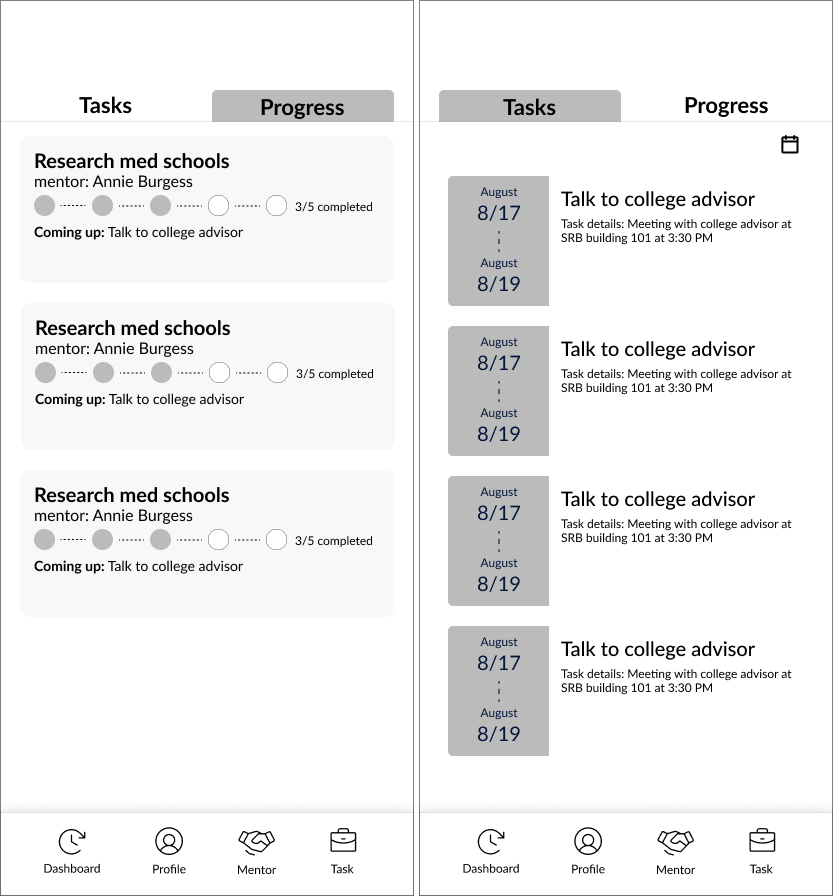
Task and Goal Pages
On the left is the Goal Tracking Page; users can use this to keep track of their overall goals, which are composed of tasks
On the right is the Task Tracking Page, where users can set details of each task and when they are due
These goals and tasks are overseen by a mentor, allowing them to keep track of their pupil’s progress
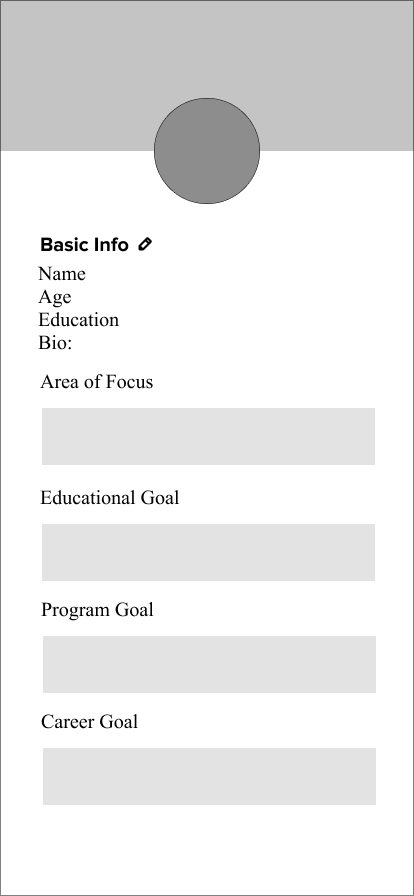
Profile Page
On the left is the Goal Tracking Page; users can use this to keep track of their overall goals, which are composed of tasks
On the right is the Task Tracking Page, where users can set details of each task and when they are due
These goals and tasks are overseen by a mentor, allowing them to keep track of their pupil’s progress
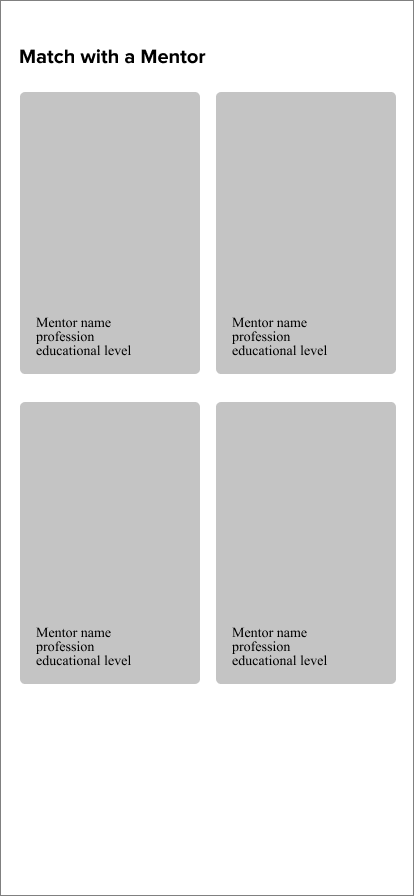
Mentor Matching Page
The Mentor Matching Page displays the mentor’s image and information on the card
Tapping the card will allow for the user to see more information about the mentor
This is how the user will find and request the mentors they wish to eventually work with
Iteration: Refining the Experience
After initial user testing with our low-fidelity prototype, we discovered a few key problems with our wireframes. For example, our profile page had too many redundant boxes, and the tasks and progress page felt unclear and unintuitive. So, we continued iterating and adding features until we came to a final high-fidelity design. Our iterations focused on fixing current issues as well as adding more features to make the app functional and usable.
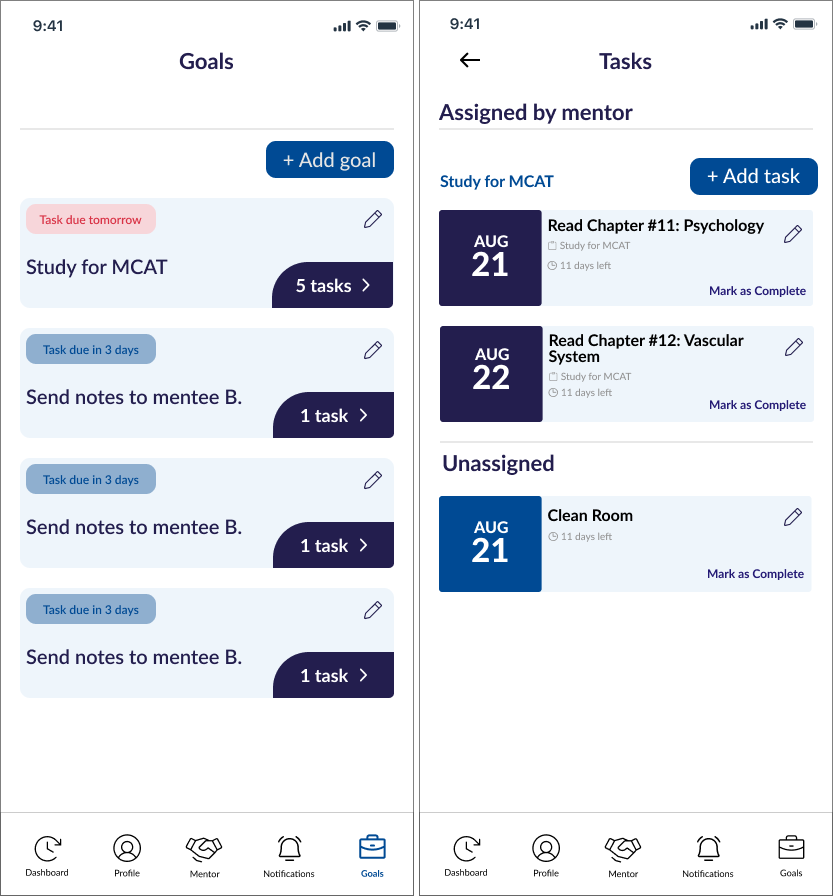
Task and Goals Page
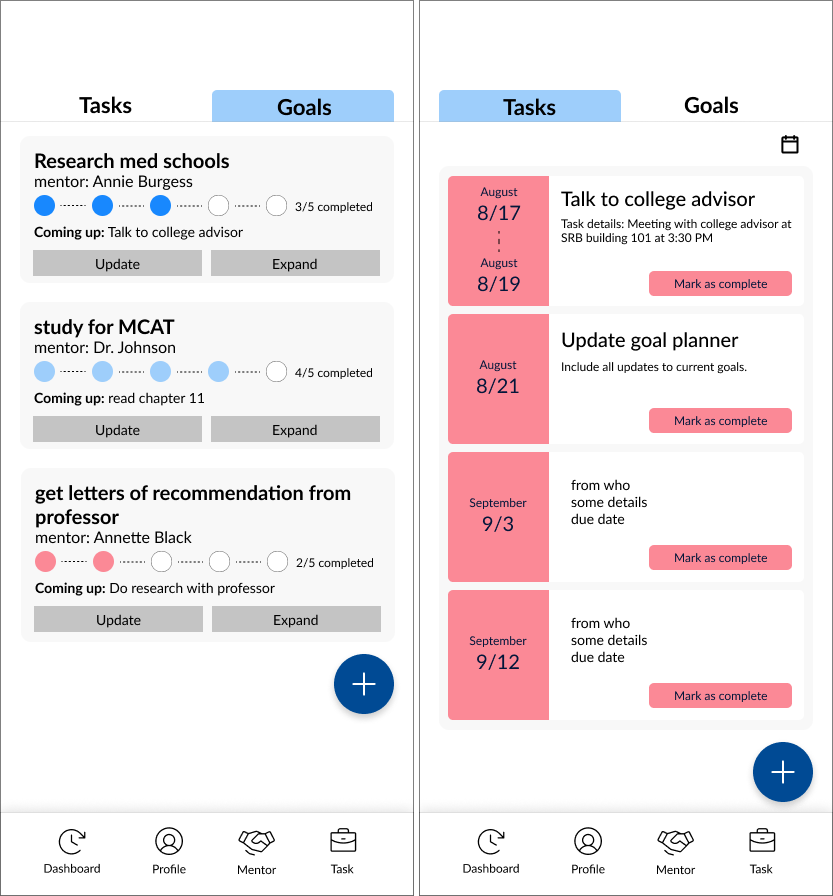
V2
Final Version
Simplified navigation by renaming Progress to Goals and separating the Task and Goal pages for greater clarity.
Improved task management with streamlined actions for creating, editing, and completing tasks and goals.
Enhanced visual hierarchy by refining button styles, adding task containers, and replacing circular progress indicators with a clearer numeric format.
Increased productivity by automatically prioritizing tasks and goals based on upcoming due dates.
Profile Page
V2
Final Version
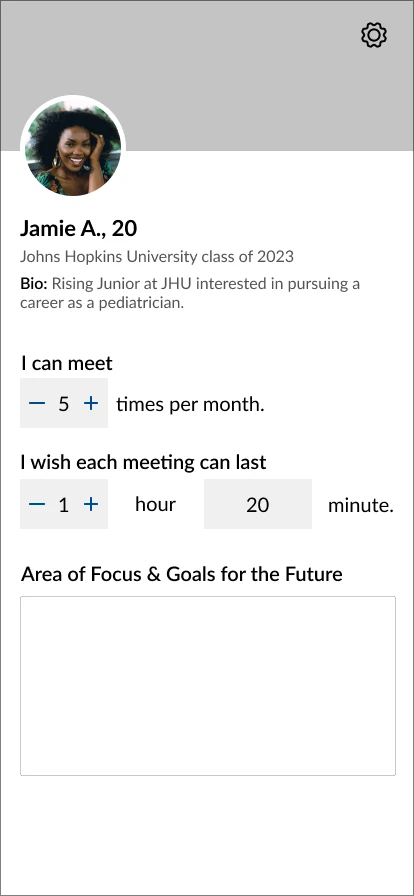
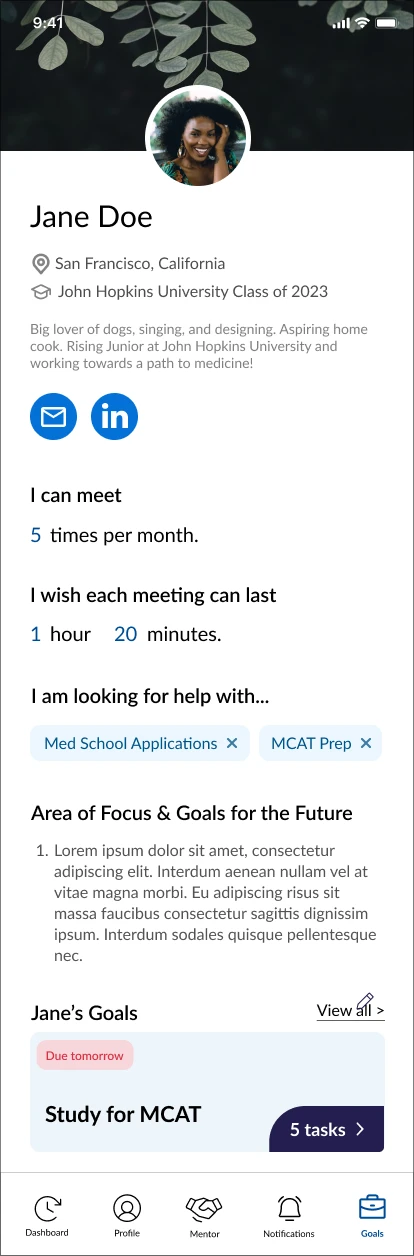
Improved profile usability by displaying meeting frequency at a glance and consolidating redundant text fields into a simpler, more streamlined layout.
Increased accessibility by adding quick-access LinkedIn and email buttons for easier communication.
Enhanced mentoring and matching by introducing tags for filtering and recommendations, along with a Goals section to help mentors track mentee progress.
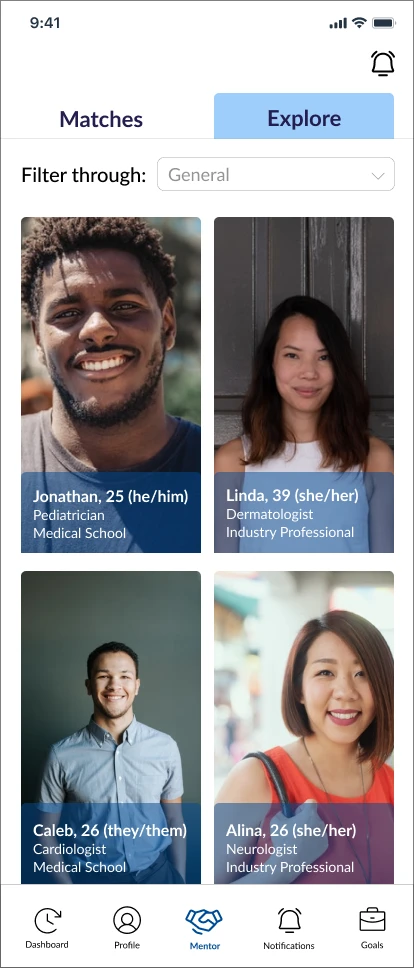
Mentor Matching Page
V2
Final Version
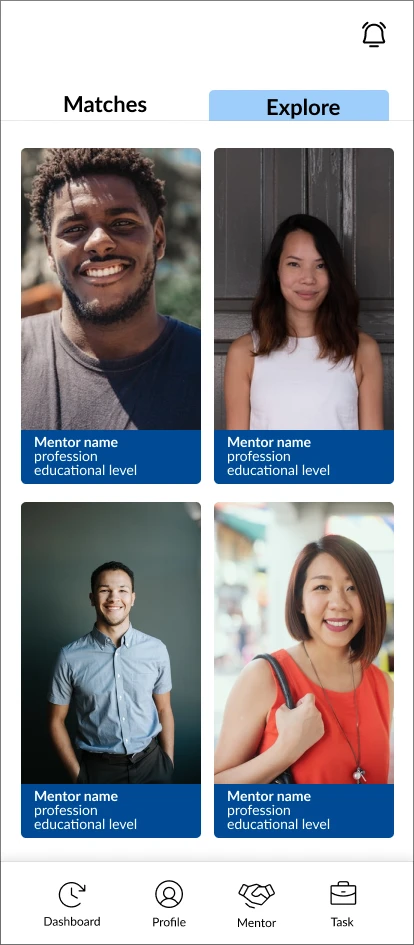
Made the Matches and Explore tabs larger and thus more clickable
Slightly made the backdrop opaque so the text is still visible but does not completely block the image
Added a filter search bar so it is easier to search for the mentors users want to look for
Final Designs
This MVP focused on the mentee experience, with a dedicated mentor flow identified as the next phase of product development.
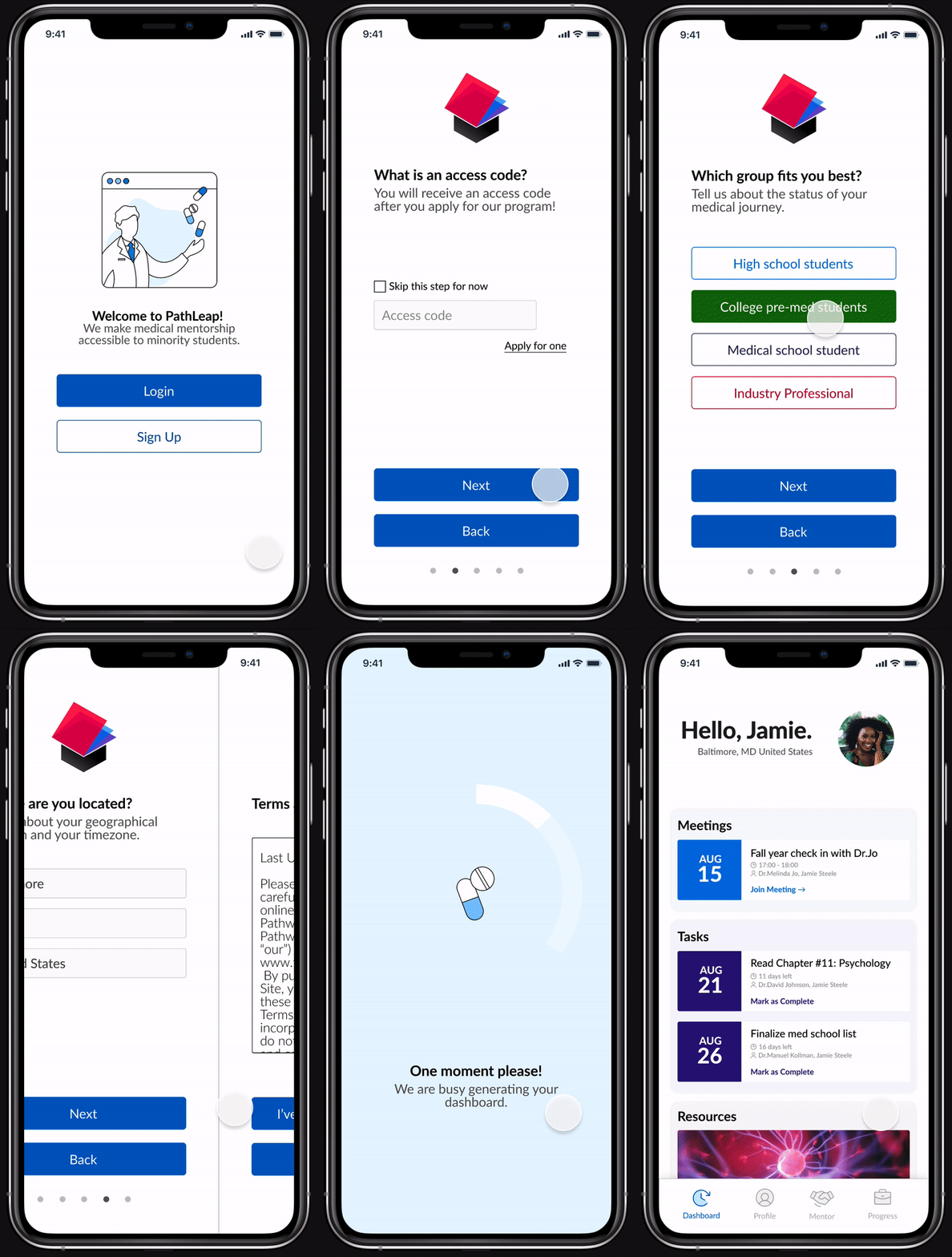
Seamless Onboarding
The on-boarding quiz gathers the user's basic information, time zone, and education level to help prepare dashboard.
Students interested in the PathLeap program need to apply for an access code through the company's website. The code grants access to the application's full feature, including mentors.

Build Your Profile
Customize your profile to include your email, your Linkedin, your goals in life, as well as other interesting tidbits about yourself.
Use your profile to show to other users how often you can meet, and what you are looking for help with.

Personalized Invitations
Users can request mentor-ship from mentors of their liking with a personalized message.
Decisions are displayed in 'Matches' if a mentor agrees to mentor a mentee.

Stay Organized
Track your progress with the goal and task tracker and never miss another deadline.
Discuss your next steps with your mentor and keep your mentor updated on your progress.
Designing for the Pathways Initiatives is a special experience for me as it showed me the power of design to bring change. I am extremely proud of our product and a special thank you to Amanda Lo, our design mentor, and my amazing design team!
Stepping into my first Design Lead role challenged me to strengthen my communication and collaboration skills while effectively guiding both my design team and development partners.
I had to learn to design creatively but also with constraint; many designs could not be added to the final product due to development limitations and our limited time
This was my first time working with clients; I had to gain the confidence to present to them our design ideas and represent my entire team and learn how to remain firm when clients wanted more than we could provide